PassKit is one of the more mature platforms in the digital wallet space. It positions itself as an “operating system for mobile wallet engagement,” which is a bold phrase, but the product direction is pretty clear: help businesses create, distribute, update, automate, and analyze Apple Wallet and Google Wallet passes without forcing customers to download another app.
That matters because wallet passes are not just digital replacements for paper coupons or plastic cards anymore. Done well, they become a lightweight customer engagement channel: loyalty cards, memberships, coupons, event tickets, boarding passes, gift cards, access passes, and more.
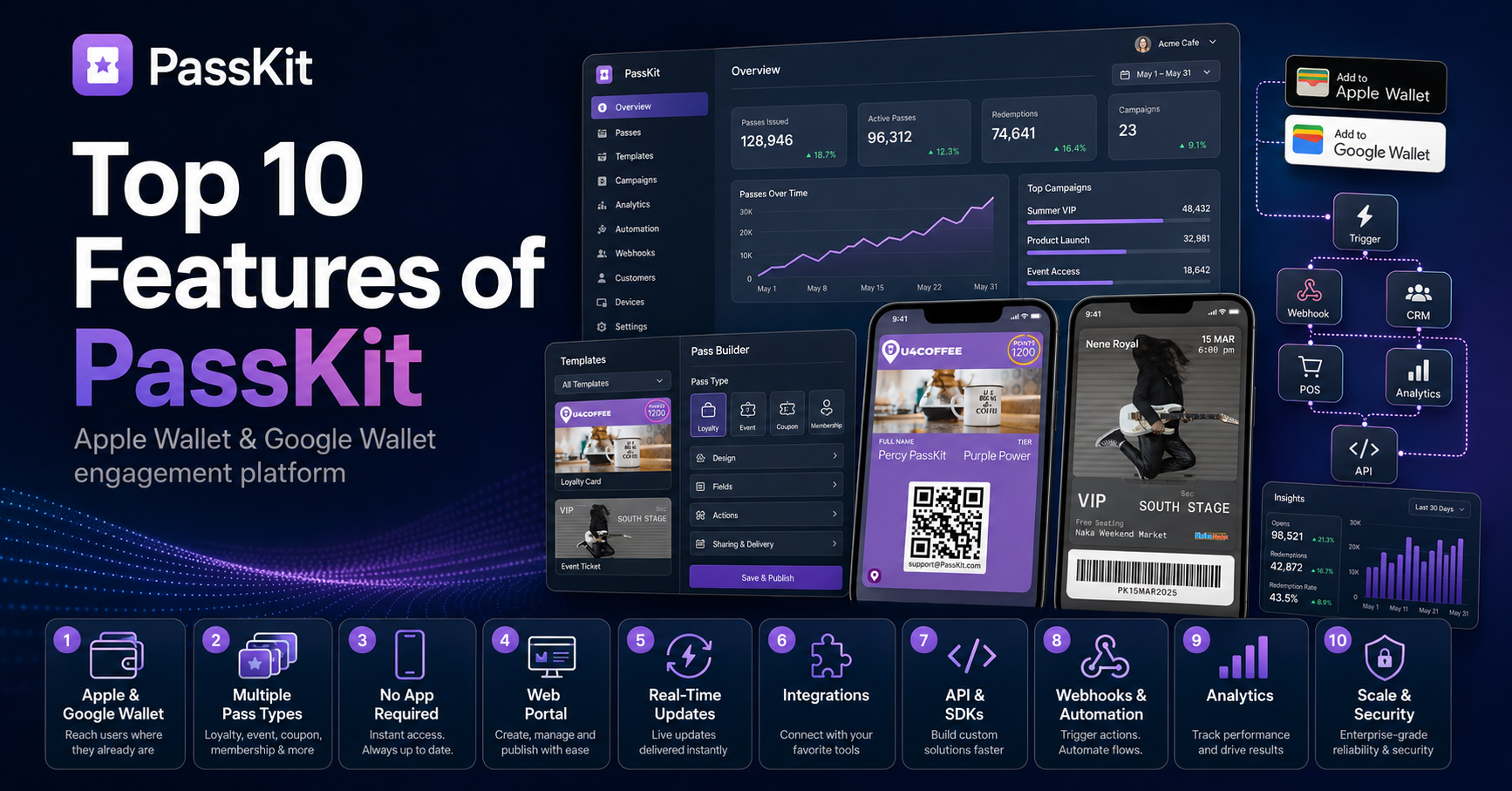
Here are the top 10 PassKit features worth paying attention to.
- Apple Wallet and Google Wallet support in one platform
The first big feature is the obvious one: PassKit supports both Apple Wallet and Google Wallet from a single platform. That means businesses can create and manage wallet passes for iPhone and Android users without building and maintaining two separate systems. PassKit specifically lists loyalty cards, membership cards, coupons, event tickets, boarding passes, and other pass types as supported use cases.
That is the real value proposition. Most teams do not want to become wallet infrastructure experts. They want a reliable way to launch passes, keep them updated, and connect them to their existing customer systems.
- Multiple pass types out of the box
PassKit is not limited to one narrow use case. The platform supports a range of common wallet pass formats, including loyalty cards, memberships, coupons, tickets, gift cards, and policy passes. Its homepage also points users toward ready-made templates for different pass types, so teams can start from a structure that already fits the campaign they are trying to run.
That flexibility is important. A retailer might need loyalty cards and coupons. A venue might care about event tickets. A gym, club, or association might need membership cards. A travel or insurance brand may have entirely different pass logic. PassKit’s product footprint suggests it is built for that broader category of “wallet engagement,” not just one kind of pass.
- No app download required for customers
One underrated feature of wallet passes is that they avoid the “please download our app” problem. PassKit’s FAQ says customers can add passes directly to Apple Wallet or Google Wallet through channels like email, SMS, QR code, or a website.
That is a big deal. Asking customers to install a new app is a high-friction move. Asking them to add a pass to the wallet app they already use is much easier. For many businesses, that difference can determine whether a campaign actually gets adopted.
- A web portal for non-developers
PassKit is not only an API product. Its public materials make clear that teams can build and manage passes in the web portal, while developers can go deeper with APIs, webhooks, Zapier, Make, and custom integrations.
That split is healthy. Marketing and operations teams need a place to design, launch, and manage wallet programs without filing a ticket for every small change. Developers still need reliable technical surfaces when the wallet program has to connect to a CRM, POS, ecommerce store, app, or backend system.
The best wallet platform is not “no-code” or “developer-only.” It gives both groups the tools they need.
- Real-time pass updates
Static wallet passes are useful. Dynamic wallet passes are much more interesting.
PassKit says its platform supports real-time updates for things like points, balances, check-ins, and redemptions. It also describes its role as handling secure generation, distribution, and updating of passes while businesses focus on design and system connections.
This is where wallet passes start behaving less like PDFs and more like living customer records. A loyalty card can show a new points balance. A coupon can reflect expiration or redemption status. An event ticket can be updated with gate information. A membership card can reflect a tier change.
That kind of updating is the difference between “we issued a pass once” and “we have an active wallet channel.”
- Integrations with CRMs, POS systems, websites, and apps
PassKit’s integrations story is one of its stronger selling points. The company says businesses can connect PassKit to existing systems using APIs, webhooks, Zapier, Make, and custom integrations. The listed use cases include syncing customer data, triggering pass updates, automating loyalty actions, and connecting to CRMs, POS systems, apps, or websites.
The integrations page also frames wallet integrations around practical business outcomes: triggering updates, keeping customers informed about events or expiring coupons, and collecting pass data such as install date, wallet type, and location for reporting and campaign measurement.
That is exactly where wallet platforms usually succeed or fail. Making a nice pass is easy. Keeping it synchronized with the rest of the business is the hard part.
- API and developer tooling
PassKit has a dedicated developer documentation site, and its docs describe the API as a way to integrate programs with Apple Wallet and Google Wallet while avoiding the need for customers to download a separate app.
It also maintains public GitHub repositories and quickstarts for multiple languages, including Go, C#, Java, Node, PHP, and Python. Those quickstarts are described as helping developers create, distribute, analyze, and manage digital coupons, memberships, boarding passes, and event tickets for Apple Wallet and Google Pay/Google Wallet.
That matters for technical teams. A dashboard may be enough for a small campaign, but serious wallet programs usually need backend integration, custom issuance logic, data synchronization, and automated updates. APIs and SDKs are what make that possible.
- Webhooks and automation
PassKit supports webhooks and automation workflows through integrations such as Zapier and other custom setups. Its own FAQ says PassKit connects through APIs, webhooks, Zapier, Make, and custom integrations, while its integrations materials describe using connected systems to trigger wallet updates and collect pass engagement data.
This is a key feature because wallet events are most useful when they cause something else to happen. A pass is installed. A coupon is redeemed. A member changes tier. An event ticket gets updated. A customer becomes eligible for a new offer.
Without automation, those events are just records in a dashboard. With automation, they can become CRM updates, email triggers, POS changes, analytics events, or support workflows.
- Analytics and campaign measurement
PassKit’s integrations page specifically mentions analytics and insights, including pass data collection such as install date, wallet type, and location to support marketing insights, campaign measurement, reports, and dashboards.
That is not a small detail. Wallet programs should be measurable. A team needs to know how many passes were issued, how many were installed, which wallet types customers used, what happened after issuance, and whether redemptions or updates are working as expected.
A wallet pass campaign without measurement is just a digital handout. A wallet pass campaign with analytics becomes something a business can tune.
- Scale, reliability, and pricing transparency
PassKit also leans into operational credibility. Its homepage says the platform is SOC 2 Type II certified, reports 99.5% uptime, uses automated failover, has zero maintenance windows, and is trusted in 140+ countries. It also says PassKit is a Google Wallet Premier Partner.
Pricing is also published clearly. PassKit advertises a 45-day free trial, no contracts, no setup fees, and plans starting from $39.50 per month. The rate page explains that the platform fee covers hosting, maintenance, and security, includes up to 250 multi-use passes and 250 single-use passes, and scales based on team members and pass volume.
That combination matters for business buyers. Wallet infrastructure is not something you want to treat casually. You need confidence that the platform can scale, that the pricing model is understandable, and that the product is built for ongoing operations rather than one-off experiments.
Final take
PassKit’s strongest feature is not any single pass type or dashboard screen. It is the fact that the platform treats wallet passes as an operational channel.
You can design passes, issue them across Apple Wallet and Google Wallet, distribute them without making customers download an app, update them in real time, connect them to existing systems, automate workflows, measure engagement, and hand developers the tools they need when the program gets more serious.
That is the right way to think about mobile wallet engagement. The pass itself is only the front end. The real product is everything behind it: issuance, updates, integrations, analytics, automation, reliability, and scale.
DEVELOPER MODE